Design it. Quote it. Submit it.
Enter an address, view aerial imagery, draw your connection route, and generate a professional quote — all in minutes. Built for ASP Level 2 electricians across Australia and New Zealand.
How It Works
From address to quote in four steps
No site visit. No guesswork. Design your ASP Level 2 connection and generate a quote from your desk.
Enter the address
Type the job site address. The map centres on the property and auto-detects your local DNSP — all major Australian and New Zealand network providers supported.
View aerial imagery
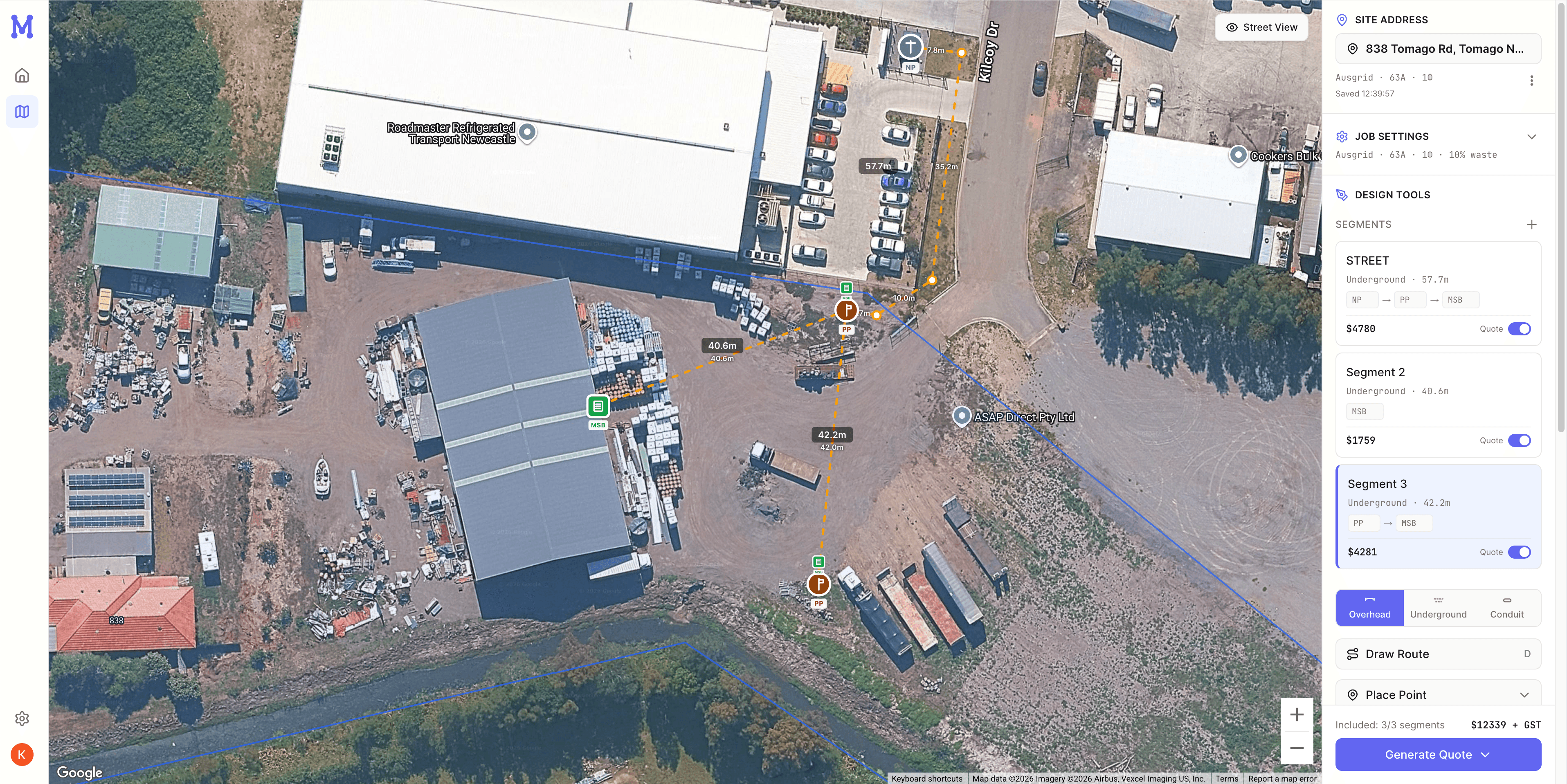
High-resolution aerial imagery loads so you can see the property, existing poles, and surrounding infrastructure — no site visit needed.
Draw the connection
Place the network pole, new poles or pillars, point of attachment, and switchboard. Draw overhead or underground segments — distances calculate automatically.
Get your quote
Materials populate from your price catalogue, voltage drop is checked against AS/NZS 3008, and a professional PDF quote is ready to send.
Features
Everything you need to design and quote
Purpose-built for ASP Level 2 connection work. No bloat, no features you'll never use — just the tools that save you time on every job.
Accurate distance calculation
Draw your cable route on the map — path length calculates automatically from the actual drawn route, not straight-line. Configurable waste factor for real-world accuracy.
AS/NZS 3008 voltage drop
Select your service rating and cable size — get an instant compliant or non-compliant readout. Try different cable sizes on the spot to find the right fit.
Auto materials & quoting
Cable per metre, conduit, poles, pillars, inspection pits — materials populate automatically from your editable price catalogue. Add labour, export a professional PDF.
Inspection pit auto-trigger
Underground runs exceeding 50m automatically flag the inspection pit requirement per Service and Installation Rules — one less thing to remember.
AI-generated client proposals
Once your design is done, generate a professional client-facing proposal with a single click. Your business details and terms stay fixed — only the job-specific content is generated.
DNSP auto-detection
Enter the address and your local network provider is auto-detected from the postcode. All major Australian DNSPs and New Zealand networks supported. Override manually if needed.
Built-in materials catalogue
Pre-loaded with ASP Level 2 materials — cable, poles, pits, switchboards, and more. Prices auto-populate from your design. Customise every price to match your trade rates.
Fergus integration
Already use Fergus? Connect your account to pull your supplier price book, then push completed jobs and quotes directly into Fergus for scheduling and invoicing.
Pricing
Simple, fair pricing
Free while we build and test with early users. No credit card, no commitment.
Early Access
During beta — no strings attached
- Aerial imagery design canvas
- Point placement & route drawing
- Automatic distance calculation
- AS/NZS 3008 voltage drop check
- Built-in ASP L2 materials catalogue with customisable pricing
- Auto-populated bill of materials from your design
- PDF quote export
- AI-generated client proposals
- DNSP auto-detection (AU & NZ)
- Fergus integration — sync jobs, quotes & supplier pricing
- Install as an app on any device (PWA)
Ready to streamline your quoting?
Stop guessing distances and calculating by hand. Design your ASP Level 2 connections visually and quote with confidence.